
*NEW* StarWind V8 [BETA] is here!! and it looks VERY promising!!
For some small to medium sized businesses and even some home power users, shared storage is a must-have. Unfortunately, standard high performance SANs carry with them a hefty price tag and a massive administrative overhead – so an EMC or NetApp filer is often out of the question. What is the answer? Turn an everyday server into an iSCSI storage server using iSCSI software target software.
Microsoft’s iSCSI target software was originally part of the Windows Storage Server SKU and only available to OEMs. When Windows Storage Server 2008 was released, it was also included in Technet subscriptions making it readily available for businesses and home users to test and validate. Windows Storage Server 2008 R2 was different – it was released as an installable package to any Server 2008 R2 install – but again, it was available through Technet. Then, in April of 2011, Microsoft released the iSCSI target software installer to the public (in this blog post).
Enter Starwind. They have had a software target solution around for quite some time – the current release version is 5.8. The free-for-home-use version is becoming very feature rich – features include thin provisioning, high speed cache, and block level deduplication. The pay versions add multiple server support, HA mirroring, and failover – the full version comparison can be found here.
The Test Setup
I first want to compare both solutions side by side – first testing general OS performance, then more specialized workloads, etc. All network traffic is carried on a Catalyst 2970G switch, on the native VLAN with all other traffic – this is not an optimal configuration, but I want to start with the basics and try to improve performance from there.
iSCSI Target Server
- Whitebox Intel Xeon 5160 Dual Core 3.0GHz
- 3GB RAM, single GbE link
- 60 GB iSCSI LUN presented from standalone 80GB 7200RPM SATA disk
ESXi 5.0 Host Server
- Whitebox AMD Athlon X2 3.0 GHz
- 8GB RAM, single GbE link
Windows 7 Test VM
- 2 vCPU, 2GB RAM
- Windows 7 SP1 x86
- 20GB system volume – *Thick provisioned, eager zeroed
Comparison 1: Installing OS
StarWind
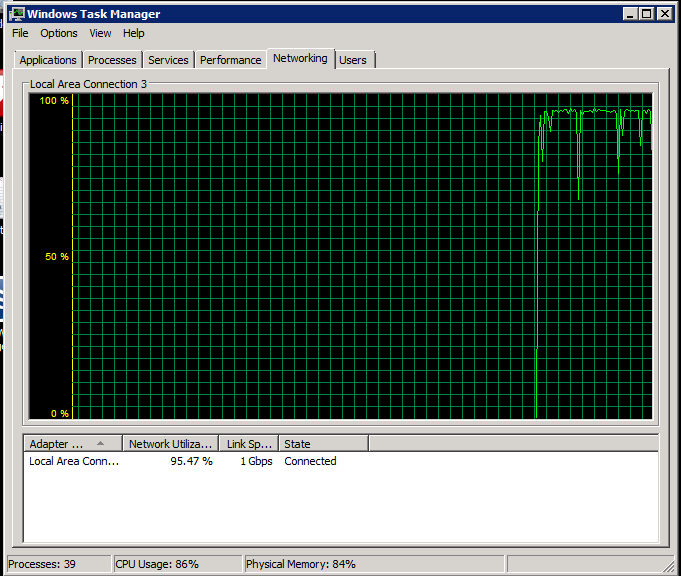
The StarWind target was installed, and a virtual volume presented over iSCSI – 60GB, with deduplication turned on and a 1.5GB cache enabled. First impressions: OS installation is very quick – I did not time it, but it was remarkably quick. During the install, the iSCSI server was clearly using most of its resources for iSCSI operations – the single 1GbE link was saturated at 95%:
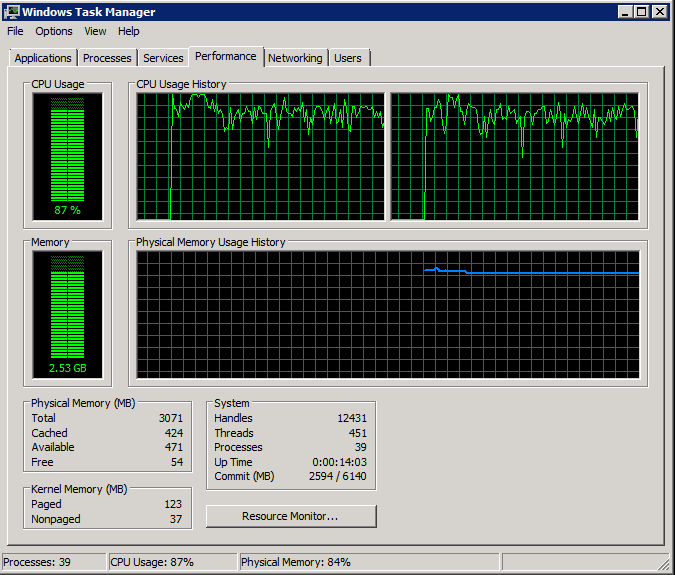
The high speed cache feature is very clearly a factor as it allocates the RAM immediately, and the CPU load is all from the StarWind process:
Microsoft iSCSI
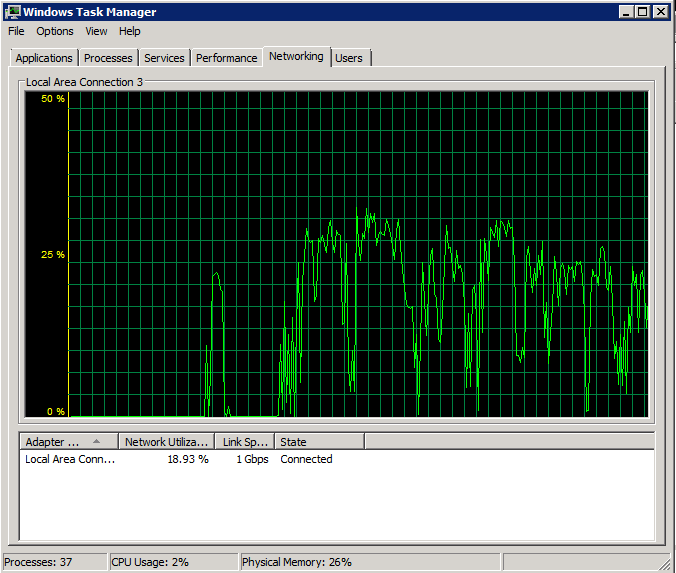
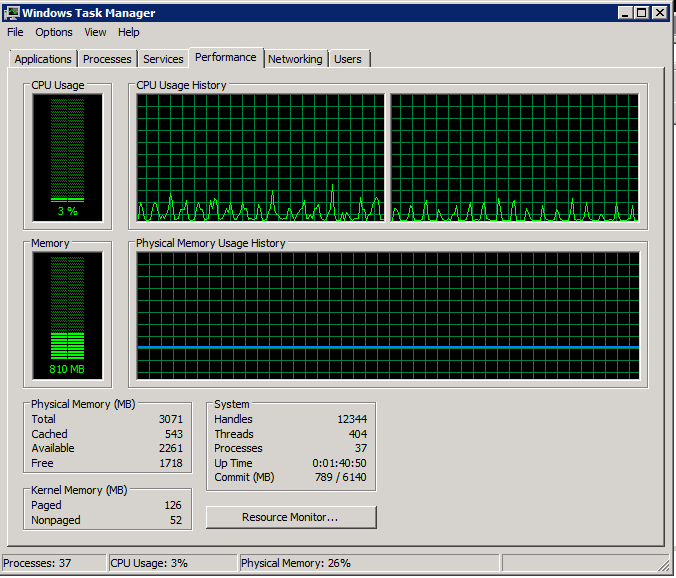
The Starwind software was uninstalled and the Microsoft target software installed in its place. A 60GB LUN was presented to ESXi – and OS installation began (the VM was created with the same specs). Immediately, it was obvious that the installation was going much slower than with the StarWind target software. The resources in use by the iSCSI server clearly show this:
Average network use is around 30%:
Same story with CPU use and allocated RAM:
Comparison 2: IOMeter Test
Here is the configuration used for the tests:
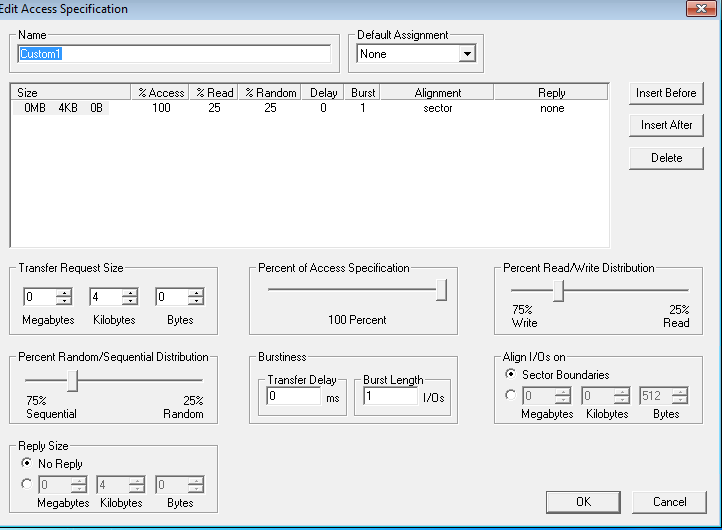
StarWind
This test may be a bit one sided due to the fact that this test VM is the only running on this datastore, and thus the entire IOMeter test file is likely coming from the RAM cache. Either way, here are the results:
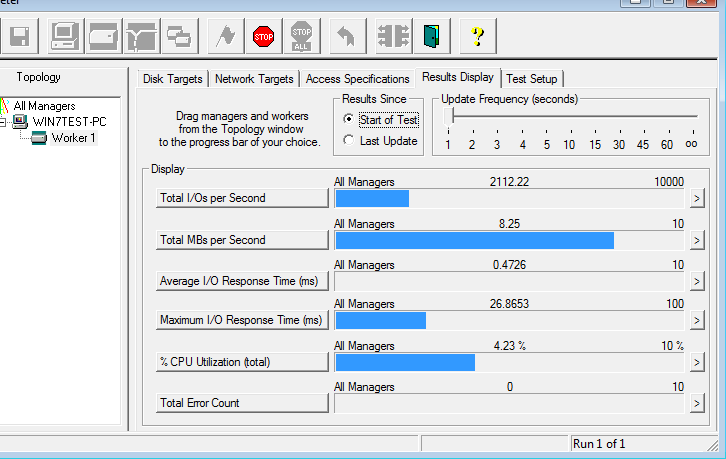
It will be interesting to see if this performance scales with more VMs (containing similar blocks – in the kernel, etc) and with more RAM in the iSCSI server.
Microsoft iSCSI
The results while using the Microsoft software target:
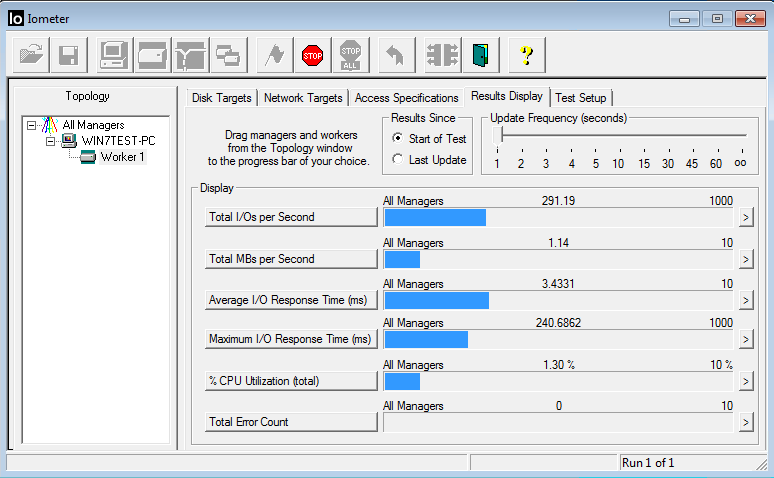
Part 1 Results
IOMeter clearly shows a 10X improvement in performance – these results will need to be verified with a heavier load, but I can only imagine that more RAM and faster base storage disks will only improve these results.
In part 2 I will see if these results will scale with multiple server VM workloads – and also how effective the StarWind deduplication engine is.
Jake, thank you for this one! If you'll need anything from StarWind Software to run your tests please let us know.
Best wishes,
Anton Kolomyeytsev
P.S. Do a test run MS Vs. StarWind Vs. ZFS-based iSCSI and people will LOVE you and twit your blog all-over-the-world!
Anton-
I was planning on comparing the results of both of these vs. FreeNAS – NFS and iSCSI. While I can't provide the same storage server performance metrics, I was planning on using simple VM based metrics such as OS install times, boot times, vm local disk queue – and IOMeter. Thanks!
Excellent articles Jake.
We actually just went thru something similar to what you posted here, and it confirms our findings.
We gave Microsoft 2008 R2 NFS a try, and put about 25 VM's on it with around 125 users total in our organization. The NFS performance was horrible, we had to fall back to local storage and come up with a new plan.
We switched to Starwind, and what a difference! Our VM's are running great, and the deduplication really saves on our storage space on the backend. We could barely fit all of our VM's across the local storage on the ESXI hosts, and on our shared storage we have just about the same amount as all our ESXi local storage combined. While we were 90% full on local storage, each of our lun's aren't even 50% full.
Jake, all interesting stuff here.
I'd like to see a NexentaStor based hardware appliance in optimal configuration against both MS and Starwinds targets. Would be intereresting to compare that to something running under the latest illumos builds (OpenSolaris replacement).
I'd also like to see a comparison of VMware vSphere5 VAAI support (including UNMAP) as that could make a huge difference in terms of perceived throughput on deploying new VMs etc. The real test of any iSCSI target in a VMware environment is how well it handles under heavy load dealing with large amounts of random I/O.
Ashley-
I think that would be a great comparison…but it would be difficult to compare apples to apples. For example, to optimize NexentaStor (and FreeNAS) one would be inclined to throw an SSD into the server for the ZIL and\or L2ARC.
To be honest, I'm not sure how best to compare this to the other products. For example, an Adaptec series 6 card could be used with MaxCache (http://www.adaptec.com/en-us/_common/series6_family/) – but this could be applied in all comparisons.
Would a better comparison be to use a single SSD for the Windows Server based software targets? This is partly why I am storing the datastores on a single spindle, without trying to 'optimize' each solution, as this presents a baseline of sorts. My idea was "here's the base performance…throw in a decent hardware controller, put your storage accross several spindles – then you should really be cooking with fire".
The MS iSCSI target is downright retarded. It doesn't support VHDX and it doesn't support disks as LUNs. Your LUNs can only be VHD files. Their explanation is that SMB Direct makes SAN irrelevant so they didn't focus much on it. Good job guys.
This article is outdated and doesn't apply anymore. I'm running comparisons now between StarWind iSCSI SAN & NAS Free V6 vs Microsoft 2012 R2 iSCSI Target Server. The new MS product is just as fast as StarWind's product and has support for a myriad of features that didn't exist previously such as DeDupe, iSCSI Boot and more. In fact, the same performance numbers are achieved without the server-side caching functionality.
Storage Server:
Microsoft Windows Storage Server 2012 R2 using native iSCSI Target role
AMD x4 640, 8GB RAM
LSI Logic 9260-8i, 512MB cache, write-back cache enabled
8x WD 1GB Black, Raid 10
2x Intel PRO 1000/PT NICs for iSCSI MP network
ESXi Host:
AMD FX8350, 32GB RAM
Intel I350 QuadPort NIC, 2 port for iSCSI MP network using RoundRobin
Test Example:
Single VM running Windows Server 2012 R2
2 vCPU, 4 GB RAM
VMXNET3 Adapter
Using both Starwind and MS iSCSI Targets, I'm able to nearly fully saturate 2 1GbE NICs pushing an average of 193MB/S using the following test for example:
Max Throughput-50%Read,ALL
'size,% of size,% reads,% random,delay,burst,align,reply
32768,100,50,0,0,1,0,0